
Get the app
Get Grinkif on your phone
Grinkif works in your phone's browser. Put it on your home screen and it opens with one tap, like an app. It takes about 10 seconds.
On a laptop?
Point your phone's camera at the code, then tap the link to open app.grinkif.com.
Android
On Android, in Chrome
Open app.grinkif.com in Chrome first. If Chrome offers an Install button, just tap it.
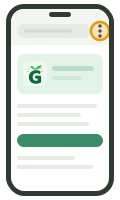 Tap ⋮, the menu at the top right.
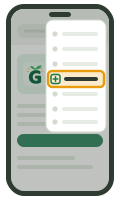 Tap Add to Home screen or Install app.
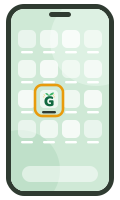 Tap Install. Grinkif is on your home screen.
Using Samsung Internet? Tap ☰ at the bottom right, then Add page to → Home screen.
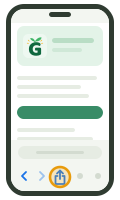 Tap Share in Safari's toolbar. On newer iPhones, tap ••• first.
 Tap Add to Home Screen. Scroll down if you can't see it.
- Tap Add. Grinkif is on your home screen.
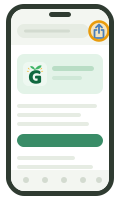
Chrome on iPhone? Tap Share at the top right, next to the address bar, then Add to Home Screen and Add. The first time you open Grinkif from the home screen on an iPhone, you sign in once more.
Good to know
Do I need to download anything from the Play Store or App Store?
No download from a store needed. Grinkif runs in your phone's browser, so there's nothing to install from a store and nothing to update: you always have the latest version. Adding it to your home screen simply puts a Grinkif icon there that opens it with one tap.
I opened the link inside Instagram or Facebook. What now?
Those apps open links in their own small browser, which can't add Grinkif to your home screen (and Google sign-in doesn't work there). Tap ⋮ or ••• at the top right and choose Open in Chrome or Open in Safari, then follow the steps above.
Does it take up space on my phone?
Hardly any. The home-screen icon is a shortcut to Grinkif, not a big download. Lessons load over the internet as your child uses them.
Ready when you are
Create your parent account, add your child, and start the 14-day free trial whenever you're ready.
Start free trialNo card needed · Nothing to download